
User Information and Service Guide - HP Carrier-Grade Server cc3310

104 Chapter 8
DIMM installation requirements are presented in Table 11-3 and a. Use only HP-approved DIMMs or
equivalents. Do not mix part numbers or manufacturers in DIMM pair installations.
Table 11-4. Table 11-3 lists approved HP DIMMs by part numbers and banking technology. (Use only HP-
approved DIMMs or approved equivalents.)
a. Use only HP-approved DIMMs or equivalents. Do not mix part numbers or manufacturers in DIMM pair
installations.
Table 11-4 lists acceptable DIMM configurations. (Do not mix part numbers or manufacturers in DIMM pair
installations.) For a current list of supported memory, call your service representative or visit the HP
support website at http://www.hp.com. Search using keyword cc3310.
NOTE The cc3310 BIOS will detect memory configuration errors with an audible alarm and/or
memory configuration alerts at bootup. The BIOS will display the following message: "violates
write ring back spec".
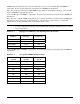
Table 11-3 HP Approved Memory and Banking Cross Reference
HP DIMM Part
Number
a
DIMM Pair
Capacity
Banking
Technology
A9884-62001 512 MB SB
A9885-62001 1 GB SB
A9886-62001 2 GB DB
A9887-62001 4 GB DB
a. Use only HP-approved DIMMs or equivalents. Do not mix part numbers or manufacturers in DIMM pair
installations.
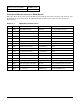
Table 11-4 Acceptable DIMM Configurations
DIMM 1A
and 1B
DIMM 2A
and 2B
DIMM 3A
and 3B
DB Empty Empty
DB DB Empty
DB DB DB
SB Empty Empty
SB SB Empty
SB SB SB
SB DB Empty
SB DB DB
SB SB DB