
Intel Telco Alarms Manager 2.0, Revision 1.0 - HP Carrier-Grade Server cc3310 User's Guide






Intel Telco Alarms Manager 2.0
TAMTools
12
• Removing SNMP Events—Select the SNMP tab and select details to view event details. Select the
event that you wish to remove and then select Remove. This configuration change is updated to the xml
file and can be viewed immediately in the details window.
OSD Tab
TAMTools provides an on-screen display tool that shows the Telco Alarms Manager state and the Telco
Alarm Panel state. TAM OSD is available for use as a debug or development tool. The OSD Event Agent
allows you to set and clear LEDs and it lists alarm information for all event records stored in TAM.
OSD Configuration Options
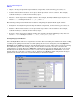
Select the OSD tab and go to Options > Configure in the TAMTools menu bar. In the Configure dialog,
selections are presented for Alarm Persistence and Alarm Model.
Alarm Persistence—The behavior of the Alarm LEDs through system restarts is configurable on a per
Event Agent basis. TAM can automatically clear alarms from specific Event Agents upon restart, or the
alarms can be left for the Event Agent to clear when it determines its health state. Please note that
changing this setting only affects OSD Event Agent alarm records.
Alarm Model—Alarm models are discussed on page 8. Changing this setting affects all installed Event
Agents on the system.