
Intel Telco Alarms Manager 2.0, Revision 1.0 - HP Carrier-Grade Server cc3310 User's Guide




Intel Telco Alarms Manager 2.0
TAMTools
10
• Object— An object represents major hardware component(s) such as memory, processors, etc.
• Counter—The monitored value(s) of an object. Each object has 1 or more counters. For example,
available memory is a counter for the memory object.
• Instance— Some objects have multiple entities. For example, the PhysicalDisk object may have one
instance - c:\ or multiple instances - c:\, d:\, and e : \.
The following terms provide information needed for configuring the System Event Agent (Linux):
• Subsystem—A subsystem represents major hardware components, such as memory, processors, etc.
• Statistic—The monitored value(s) of an object. Each object has 1 or more statistics. For example,
available memory is a statistic for the memory object.
• Resource—Some objects have multiple entities. For example, the PhysicalDisk object may have one
resource – /usr or multiple resources – /,/boot,/home,/usr,/var, etc.
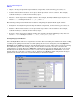
Configuring System Events
Select the System tab and select components to monitor. The last reading box will show the latest reading
according to the polling interval that is set. The polling interval can be changed by selecting Options >
Configure in the TAMTools menu bar. Set thresholds for minor, major, and/or critical events by selecting
the conditional operator and entering a value. A value must be entered to clear the event before the
configuration is accepted. Then select Add. This configuration is saved to the xml file and can be viewed
immediately in the details window. To remove events, select the System tab and details to view event
details. Select the event that you wish to remove and then select Remove. This configuration change is
updated to the xml file and can be viewed immediately in the details window.