
Intel Server Management (ISM) Installation and User's Guide, Version 5.5.5 - HP Carrier-Grade Server cc3310



Intel Server Management (ISM) Installation and User's Guide
Client SSU (CSSU) Details
34
Display Details
For all the following items, PIC displays the item only if appropriate sensors are available on the baseboard.
For example, there is a Chassis display only if the baseboard has chassis open/closed switches.
Health
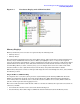
Information about all unhealthy sensors is copied under the Health branch. Select the Health branch of
the server tree in the navigation pane to get a quick and simple view of the current server health. If, for
example, a 12V voltage sensor indicates that the current status is not OK, then data about that 12V sensor
is added to the Health branch of the tree. You can select the 12V entry in either the Health or Voltage
branch of the tree to display information about the sensor.
All sensors in either a critical or noncritical condition appear in the Health branch of the tree, in addition to
their normal location in other areas of the navigation tree. In this way, you can get a quick summary of
problem areas on your server and begin corrective actions.
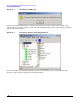
Colored icons in the Health branch of the server tree indicate individual sensor status and overall server
status:
• Green—healthy server
• Yellow—noncritical conditions
• Red—critical failures
• Blue Question Mark—unknown status
The color of the overall server health icon displays the state of the most severe sensor status. If any sensor is
in a critical condition (even if all other sensors are noncritical), the server health status is shown as critical
(red). If there are only noncritical sensors, the server health status is shown as noncritical (yellow). If all
sensors report normal conditions, the server health status is shown as OK (green).
NOTE The ISM Console icon for a server can be the wrong color (indicating an error) if that server is
configured with a static IP address.
Chassis
PIC monitors chassis door open/closed switches for managed servers that support this feature. The number
of sensors monitored depends on the server chassis. If a server supports chassis sensors, the chassis
intrusion sensor screen displays the current security status.
When a chassis door that includes an open/close switch is opened, the vulnerable state is indicated as a
critical condition in the health branch of the PIC Console, and the requested event actions are carried out.
When all chassis sensor switches are closed, PIC indicates the chassis is secure by updating the health
indicator.
Fan Sensors
The fan sensor screen displays actual fan RPM for systems that support this feature. The threshold appears
in terms of the RPM value. If the current fan RPM value falls below the specified threshold value, then the
sensor status changes and an event is generated. For the systems that do not support fan RPM threshold,
the threshold setting is 0 and read-only. If the fan stops, the sensor status changes and an event is
generated.