
HP BladeSystem Onboard Administrator Command Line Interface User Guide
VLAN commands 189
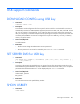
ENABLE VLAN
• Command:
ENABLE VLAN
• Description:
This command enables or turns on VLAN on the enclosure.
• Access level/Bay level:
OA administrator, OA operator
• Restrictions:
None
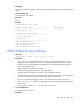
REMOVE VLAN
• Command:
REMOVE VLAN <VLAN ID>
• Description:
Removes a VLAN ID. All devices currently using that VLAN ID are moved to the default VLAN ID.
• Access level/Bay level:
OA administrator, OA operator
• Restrictions:
The user cannot remove the default VLAN ID.
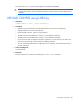
SAVE VLAN
• Command:
SAVE VLAN
• Description:
Save VLAN configuration data to FLASH.
• Access level/Bay level:
OA administrator, OA operator
• Restrictions:
This command only applies to VLAN configuration data.
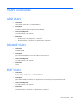
SET VLAN DEFAULT
• Command:
SET VLAN DEFAULT <VLAN ID>
• Description:
Sets or changes the default VLAN ID for the enclosure. Devices using the current default are reassigned
to the new ID.