
HP BladeSystem c7000 Enclosure Quick Setup Instructions




7
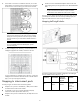
NOTE: When installing a fan in the top row of fan bays,
orient the fan so that the LED is in the lower right corner.
When installing a fan in the bottom row of fan bays, orient
the fan so the LED is in the upper left corner.
2. Install fan blanks in any unused fan bays.
3. Install the Onboard Administrator with KVM modules into the
Onboard Administrator with KVM tray based on the total number
ordered:
o One Onboard Administrator with KVM module: Bay 1
o Two Onboard Administrator with KVM modules: Bays 1
and 2
Install an Onboard Administrator with KVM blank into any
unused Onboard Administrator with KVM bay.
Connecting the cables
1. Identify all connectors.
Item Connector Description
1 OA/iLO
Ethernet 1000BaseT RJ45 connector, which
provides Ethernet access to the Onboard
Administrator with KVM and the iLO on each
blade. Also supports interconnect modules with
management processors configured to use the
enclosure management network. Autonegotiates
1000/100/10 or can be configured to force
100Mb or 10Mb full duplex.
2 USB
USB 2.0 Type A connector used for connecting
supported USB devices such as DVD drives, USB
key drives, or a keyboard or mouse for enclosure
KVM use. To connect multiple devices, a USB hub
(not included) is required.
3
Serial
connector
Serial RS232 DB-9 connector with PC standard
pinout. Connect a computer with a null-modem
serial cable to the Onboard Administrator with
KVM command line interface (CLI).
4
VGA
connector
VGA DB-15 connector with PC standard pinout.
To access the KVM menu or Onboard
Administrator with KVM CLI, connect a VGA
monitor or rack KVM monitor for enclosure KVM.
5
Enclosure
link-down
port
Connects to the enclosure link-up port on the
enclosure below with a CAT5 patch cable.
6
Enclosure
link-up
port and
service
port
Connects to the enclosure link-down port on the
enclosure above with a CAT5 patch cable. On a
stand-alone enclosure or the top enclosure in a
series of linked enclosures, the top enclosure
link-up port functions as a service port.
2. To connect to the management network, connect a standard
CAT5 patch cable to the OA/iLO port of each installed Onboard
Administrator with KVM module.