
HP BladeSystem c7000 Enclosure Quick Setup Instructions




6
CAUTION: Do not mix HP 2250W, HP 2400W High
Efficiency, HP BL7000 2400W Platinum, or -48vDC
power supplies in one enclosure. Install only one type of
power supply in a single enclosure.
If your HP BladeSystem c7000 Enclosure is equipped with a
three-phase power configuration, you need six power supplies.
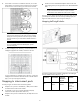
To install a power supply:
1. To gain access to all power supply bays, slide the HP
BladeSystem Insight Display to the right or left as needed.
2. Remove the power supply blank.
3. Insert the power supply into the enclosure, and then close the
power supply bracket.
NOTE: This document discusses installation of AC power
supplies only. For information on configuring DC power
supplies or HP Carrier Grade Solutions, see the
documentation that came with your power supply.
4. Add any ordered options to each server blade:
o Additional processor
o Additional memory
o Mezzanine option cards
5. (Optional) If you are installing a full-height device, remove the
half-height device bay shelf. If you are installing a half-height
device, omit this step.
6. Remove the connector covers.
7. Install the server or storage blades.
8. Install device bay blanks into any unused device bays.
If the empty bays are configured for a full-height device, join two
device bay blanks to create a full-height blank.
Installing the rear components
CAUTION: To prevent improper cooling and thermal
damage, do not operate the enclosure unless all bays are
populated with a component or a blank.
1. Install fans in even-numbered groups, based on the total number
of blades installed in the enclosure:
o Four fan configuration—Fan bays 4, 5, 9, and 10 are used
to support a maximum of two devices located in device bays
1, 2, 9, or 10. Only two device bays can be used with four
fans.
o Six fan configuration—Fan bays 3, 4, 5, 8, 9, and 10 are
used to support devices in device bays 1, 2, 3, 4, 9, 10, 11,
or 12.
o Eight fan configuration—Fan bays 1, 2, 4, 5, 6, 7, 9, and
10 are used to support devices in all device bays.
o Ten fan configuration—All fan bays are used to support
devices in all device bays.