
How to Enable LDAP Directory Services Authentication to Microsoft Active Directory in the HP cClass Onboard Administrator


Troubleshooting:
If you are having trouble authenticating, the following steps might help:
I. Testing SSL
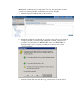
A simple test to see that SSL is working on the DC’s in your domain is to open a browser
and navigating to https://<domain_controller>:636 (substitute your DC for
<domain_controller>). You can substitute <domain> in place of <domain controller>
which will go to DNS in a round robin fashion to see which DC is currently handling
requests for the domain. It might be helpful to test multiple DC’s to see that all of them
have been issued a certificate. If SSL is operating properly on a DC (i.e. a Certificate has
been issued to it), you will be prompted by the Security dialog asking if you want to
proceed with accessing the site, or view the server’s certificate. Note that clicking “Yes”
will not yield a web page - this is normal. The test is simply to get prompted to accept the
Security Dialog. A server not listening on 636 will simply go right to a “page cannot be
displayed” message. If this test fails, it means that your DC is not accepting SSL
connections because it probably has not been issued a certificate. This process is
“supposed” to be automatic, but requires a reboot in some cases. To avoid the reboot, you
can force this to happen by following these steps:
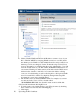
1. Open the MMC and add the “Certificates” snap-in. When prompted, choose
“Computer Account” for the type of certificates you want to view. Click OK to return to
the Certificates snap in.
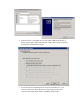
2. Navigate to Personal->Certificates folder. Right click the folder and choose “Request
New Certificate”. They type should already be “Domain Controller” and click Next until
it issues the certificate.
A second method for testing this is to go to the DC itself and run the following command:
C:\netstat -an | find /i "636"
If the server is listening for requests on port 636, you should see this response:
TCP 0.0.0.0:636 0.0.0.0:0 LISTENING
A third method of testing SSL is to use the Microsoft tool called LDP. More information
on LDP can be found at www.microsoft.com
II. Removing old Certificates.
In some cases, an old certificate may be present on the DC that points to a previously
trusted CA with the same name. This usually doesn’t happen unless Certificate Services
is added and removed and then added again. To resolve this, use the method in Step 1
above and refer to the HP Customer Advisory EM030604_CW01 listed here: