
How to Enable LDAP Directory Services Authentication to Microsoft Active Directory in the HP cClass Onboard Administrator

-----BEGIN CERTIFICATE-----
MIIFxDCCBKygAwIBAgIKJWUSwAAAAAAAAjANBgkqhkiG9w0BAQUFADBVMRMwEQYK
CZImiZPyLGQBGRYDY29tMRIwEAYKCZImiZPyLGQBGRYCaHAxFzAVBgoJkiaJk/Is
ZAEZFgdhdGxkZW1vMREwDwYDVQQDEwh3aW5kb3pDQTAeFw0wNjA4MjIyMDIzMTFa
Fw0wNzA4MjIyMDIzMTFaMCAxHjAcBgNVBAMTFXdpbmRvei5hdGxkZW1vLmhwLmNv
bTCBnzANBgkqhkiG9w0BAQEFAAOBjQAwgYkCgYEAy4zeh3iXydUAWKVHIDsxLJ6B
aRuVT9ZhkL5NQHIDeRjumsgc/jHSERDmHuyoY/qbF7JMhJ9Lh9QQHUg8QfEYsC1y
qTvgisrZeHtvmrmecvSxZm27b4Bj5XYN0VYcrwqKnH7X/tVhmwqGls7/YZyahNU1
lGB2OjoCq5eJxX+Ybx0CAwEAAaOCA00wggNJMAsGA1UdDwQEAwIFoDBEBgkqhkiG
9w0BCQ8ENzA1MA4GCCqGSIb3DQMCAgIAgDAOBggqhkiG9w0DBAICAIAwBwYFKw4D
…output truncated…
-----END CERTIFICATE-----
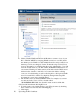
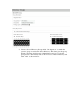
f. Return to the OA “Upload Certificate” screen and paste the certificate
contents into the window and click “Upload”.
V. Creating Directory Groups
The way that users are authenticated and privileges are assigned is by first
verifying that the username and password given to OA match the credentials in
the Directory. Once verified, OA queries the Directory to find what Active
Directory groups the user is a member of. It then matches those Group names
against the Directory Group names that exist in OA. We will create these OA
Directory Groups in this step. The group name is used to determine LDAP users'
group membership and must match one of the following five properties of a
directory group: the name, distinguished name, common name, Display Name, or
SAM Account Name.
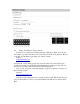
a. In OA, navigate to the Users/Authentications/Directory Groups link.
b. Click “New” to add a new directory group.
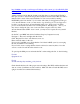
c. First, create a group called “OA Admins” which matches the name we
created in Active Directory.
i. Give this group full administrative privileges over all server bays
and interconnect bay an click “Add” as shown below.