
How to Enable LDAP Directory Services Authentication to Microsoft Active Directory in the HP cClass Onboard Administrator
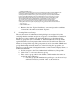


Multiple DC certificates may be uploaded. For now, just upload the one that
you know is allowing LDAP over SSL that was used in Step III.
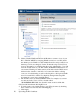
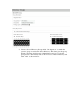
a. Click the Upload Certificate Tab as shown below.
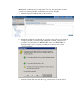
b. Obtain the certificate from the DC by opening a new web browser window
to https://<domain_controller>:636 (substitute <domain_controller> for
your DC). Note that this is an HTTPS URL and not an HTTP URL. It
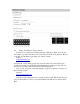
should prompt you for accepting a certificate as shown below. Click
“View Certificate”
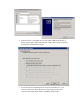
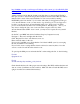
c. Click the Details Tab and click the Copy to File button as shown below.