
Installation and Reference Guide (J3210A, J3212A, J3200A, J3202A, J3204A) 1996-08


E-6
Backup Links
Indications of Backup Link Activation
Backup Links
Indications of Backup Link
Activation
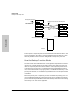
When the primary link fails (“n” consecutive test packet responses were not
received on the primary port from the other device), the backup link is
automatically enabled. The effect of this change is displayed on the monitoring
hub's LEDs and management interface. Activation of the backup link does not
change the status of any of the ports on the remote device.
On the monitoring hub's LEDs, the primary port LED goes off, and the backup
port LED goes on.
In the ASCII console or HP AdvanceStack Assistant, the status of the primary
port changes from “active” to “not active”, and the backup port changes from
not active to active.
See the online documentation for more information.
Reactivating the Primary Link
When the primary link is repaired, you can use any of the following methods
to re-enable the primary port:
■ From the ASCII console, select “Port/Segment Configuration”, then
“Disable and enable ports option”, then enable ports.
■ From HP AdvanceStack Assistant, re-enable the primary port. See the
network management product documentation for details on how to
enable a port.
■ Press the Reset button on the Management Module, or cycle power
on the stack of hubs. These processes will reset the hub and restore
the primary port's active status.
When the primary port is re-enabled, the backup port is automatically disabled
and returned to backup mode.