
Installation and Reference Guide (J3210A, J3212A, J3200A, J3202A, J3204A) 1996-08


E-4
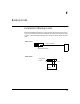
Backup Links
Configuring a Backup Link
Backup Links
Configuring a Backup Link
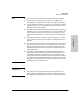
Configure the Monitoring Hub Only. All configuration of the backup links
feature is performed from HP AdvanceStack Assistant or the ASCII console.
On the “remote” device, you only need to make sure the ports used for the
primary and backup links are both enabled.
Use the Backup Function. To configure this link, you use the Backup func-
tion in HP AdvanceStack Assistant or the ASCII console. You provide the
following information:
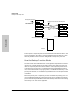
■ the device and port to be used for the backup link
■ the device and port to be used for the primary link
■ the MAC address of the device at the remote end of the link
■ how frequently (in seconds) test packets (used to check the status of
the primary link) should be sent to the remote device
■ how many consecutive response failures will trigger activation of the
backup link