
Installation and Reference Guide (J3210A, J3212A, J3200A, J3202A, J3204A) 1996-08

E-2
Backup Links
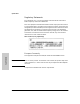
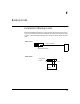
Examples of Backup Links
Backup Links
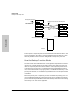
A backup link is a separate path connected between the hub and a device. The
port through which the cable is connected between the two devices is auto-
matically enabled if the connection designated as the primary link fails.
How the Backup Function Works
The hub on which the redundant link is configured is responsible for monitor-
ing the link. It sends packets to the station at the other end of the link and
looks for response packets from that station. If the response packets fail to
come back, the primary link is considered as having failed and the backup
link, which had not been carrying any traffic, is enabled automatically. If the
primary link does fail, it is automatically disabled until it can be repaired and
re-enabled.
When the primary link is repaired, you must re-enable the primary port. It is
not re-enabled automatically. When the primary port is enabled, the backup
port is automatically disabled and returned to backup mode. See “Reactivating
the Primary Link” later in this appendix.
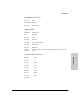
Primary Link (fiber)
Backup Link (crossover twisted-pair)
Two Hub Stacks
Switching Hub Stack 1
AdvanceStack Hub Stack 2
Server
Management Module
thin coax cable
for non-segmented
hubs
SNMP