
Installation and Reference Guide (J3210A, J3212A, J3200A, J3202A, J3204A) 1996-08

D-4
Network Addressing
Using Bootp
Network Addressing
Using Bootp
Bootp (Internet Boot Protocol) is used to download network configuration
data from a server (the Bootp server) to the hub. The configuration data the
hub retrieves from the Bootp server is:
■ the IP address for a hub segment
■ the subnet mask for the hub segment
■ the default router for that hub segment
If you have configured the hub’s IP parameters on a Bootp server, you do
not need to use the IP Configuration command in the ASCII console or
HP AdvanceStack Assistant. As shipped from the factory, the hub is config-
ured to use Bootp to retrieve the IP configuration information. If you do not
want to use Bootp because your hub is in a Novell Netware environment,
Bootp can be disabled using the ASCII console. Bootp is automatically dis-
abled if an IP address is explicitly assigned.
If you chose to manually configure a segment’s IP address, it is recommended
that you do not use Bootp for other segments. Instead you should either
disable bootp on those segments or manually configure addresses.
The Bootp Process
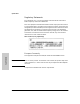
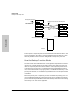
When the hub is powered on, it broadcasts Bootp requests that contain the
hub's MAC address. The Bootp server receives the request and searches its
Bootp table file for an entry that matches the hub's MAC address. If a match
is found, the configuration data in the associated file entry is returned to the
hub as a Bootp reply. For most UNIX systems, the Bootp table is contained in
the
/etc/bootptab file. This example applies to the Bootp table for UNIX:
Bootp Table File Entries
An example entry in the Bootp table file /etc/bootptab for a Switching Hub is:
switchinghub:\
:ht=ether:\
:ha=080009123456:\
:ip=190.40.101.22:\
:sm=255.255.255.0:\
:gw=190.40.101.1:\
:vm=rfc1048: