
Installation and Reference Guide (J3210A, J3212A, J3200A, J3202A, J3204A) 1996-08

C-1
C
Modem Configuration
Before installing the modems (one attached to the hub and one attached to
the terminal/PC), configure them by either issuing the appropriate AT com-
mand or by setting the modem’s switches, as described in the tables in the rest
of this appendix.
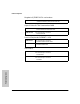
Hayes Smartmodem Optima 28.8 (V.34)
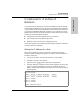
Hayes ACCURA 288 V.34 + FAX
US Robotics Courier V.FC/V.34
At the hub end: Issue the following AT command:
AT&FW2&C1&D3&K3&Q9S7=60S46=138S48=7S95=32S0=1&W
At the user end: Issue the following AT command:
AT&FW2&C1&D3&K3&Q9S7=60S46=138S48=7S95=32
At the hub end: Issue the following AT command:
AT&FW2&C1&D3&K3&Q5S7=60S36=7S46=138S48=7S95=47S0=1&
W
At the user end: Issue the following AT command:
AT&FW2&C1&D3&K3&Q5S7=60S36=7S46=138S48=7S95=47
At the hub end: Issue the following AT command:
AT&FB0X4&A3&C1&D2&M4&H1&K1&B1S7=60S0=1&W
At the user end: Issue the following AT command:
AT&FB0X4&A3&C1&D2&M4&H1&K1&B1S7=60