
Installation and Reference Guide (J3210A, J3212A, J3200A, J3202A, J3204A) 1996-08



A-2
Cables and Connectors
RS-232 Connector and Cable Pin-Outs
Cables and Connectors
RS-232 Connector and Cable Pin-Outs
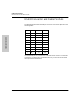
The Management Module’s RS-232 port connector is wired as depicted in the
following table.
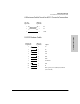
Use the RS-232 port to connect a PC to be used as the console. To make this
connection, you must use a null modem cable or you can use the minimum
cable pin-out described below.
PIN US CCITT DIN
1 DCD 109 M5
2 Rx 104 D2
3 Tx 103 D1
4 DTR 108 S1
5 GND 102 -
6 DSR 107 M1
7 RTS 105 S2
8 CTS 106 M2
9 RI 125 M3