
Installation and Reference Guide (J3210A, J3212A, J3200A, J3202A, J3204A) 1996-08



A-1
A
Cables and Connectors
This appendix lists cables that have been tested and verified for use with the
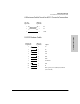
HP Management Module. It also includes minimum pin-out information so, if
you wish to use an unlisted cable, you can verify that the cables used in your
installation are correctly wired. Note that each pin-out does not necessarily
match the pin-out for the corresponding HP cable, but cables manufactured
to follow the minimum pin-out will function correctly.
Recommended Cables
You can contact your HP authorized dealer or call HP at 1-800-538-8787 to
order these parts.
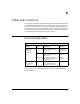
Console PC connection to the module’s RS-232 port:
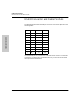
Purpose Cable Description Part No.
Connecting the
PC directly to
the module’s
RS-232 port
9-pin male RS-232 9-pin female to 9-pin fe-
male null modem or “cross-
over” cable
F1047-80002 or
F1047-60901 or
5182-4794
25-pin male
25-pin female
RS-232C 9-pin female to 25-pin
male null modem or “cross-
over” cable
RS-232C 9-pin female to 25-
pin-female null modem or
“crossover” cable
24542G
(3 meters)
25442H
(3 meter)
Connecting a mo-
dem to the hub’s
RS-232 port
25-pin female RS-232C 9-pin female to 25-pin
male standard modem or
“straight-through” cable
HP 24542M