
Installation and Reference Guide (J3210A, J3212A, J3200A, J3202A, J3204A) 1996-08

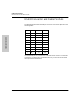


to execute these tests.
Clearing a Password for the ASCII Console
You can use the Segment Display button to clear a forgotten console password
that was previously configured on the hub. You can clear the password to
access the Management Module. The password is configured from the ASCII
console.
To clear the password, follow these steps:
1. Verify the hub has powered-up, passed self-test, and that the active LED
is lit for the Management Module.
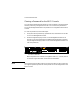
2. Press the Segment Display button on the Management Module for 8
seconds. (If you have installed a second Management Module in the stack,
only the Segment Display button on the active Management Module can
clear the password.)
When the password is cleared, all 4 segment LEDs (1, 2, 3, and 4) will be
on solid as long as the button continues to be held down.
Note After the password has been cleared, access to the hub from the console will
no longer be password protected. A new password can be assigned from the
ASCII console.
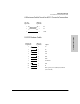
Press here for 8 seconds.
Base MAC Address
Active