
Installation and Reference Guide (J3210A, J3212A, J3200A, J3202A, J3204A) 1996-08


5-1
5
Troubleshooting
This chapter describes how to troubleshoot your Management Module and
how to troubleshoot your stack of hubs for cabling problems. This chapter
covers these topics:
■ using the problem/solution table
■ IP configuration errors
■ diagnostic tests
■ clearing a password for the ASCII console
Use the following table to diagnose the problem with your Management
Module:
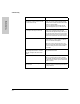
Problem Solution
How do I reset the stack of hubs? Either:
Push the reset button on the primary
Management Module.
Select stack reset from the ASCII console or
HP AdvanceStack Assistant.
The Segment Display button doesn’t
light up the 1, 2, 3 or 4 Segment LEDs.
You probably have two Management Modules
installed and you are pushing buttons on the
backup Management Module. Press the
buttons on the module where the Active LED is
on.
None of the Management Module LEDs
are on.
Either:
- You are looking at the backup Management
Module. This is normal.
- Module is loose. Make sure the Module is fully
inserted and screws are tightened.
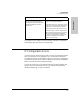
The Segment Display button lights up
all of the port LEDs on Segment 1.
All of your users are on the same segment. If
desired, move users to the other segments by
using HP AdvanceStack Assistant or the ASCII
console.
I pushed the Segment Display button.
Where do I look to see which ports are
on segment 1?
Instead of the port LEDs showing link status, the
port LEDs for a selected segment will be lit.