
Installation and Reference Guide (J3210A, J3212A, J3200A, J3202A, J3204A) 1996-08

3-7
Configuring the Switching Hubs in Software
Using the Console
Configuring the Switching
Hubs in Software
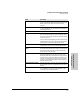
Option Description
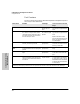
Hub Status and Counters Displays counters, system name, system contact, system
up time, segment MAC addresses, hub port status. See the
tables on the next two pages for segment and port
counters.
IP/IPX Configuration Enable/disable IP/IPX for each segment, and set address-
es. For an IP address, see the instructions in appendix D,
“Network Addressing”.
Network Connectivity Tests Allows you to perform IPX, link, and ping tests.
Port/Segment Configuration Disable or enable ports and set up backup links. Assign
ports to a segment, isolate or connect a segment. There
are 4 connected segments per stack and up to 32 isolated
segments per stack.
You can isolate up to 32 segments per stack. Note that each
isolated segment can never communicate with any other
hub because it is isolated from the Extender Cable.
Managers/Password Change Configure community name, set password, assign autho-
rized managers, select the active Management Module.
Security Configuration/Infor-
mation
View and clear security violations or turn off port security.
(To set port the three levels of security, use HP AdvanceS-
tack Assistant. The three levels are documented in the
online help and on the CD-ROM.)
Connection Configuration From this option, you can enable or disable Telnet connec-
tions and reset the stack. You can also connect to the
Expansion Slot Module if the module has a separate ASCII
console interface. (The Switch Module’s interface is not
separate. If a Switch Module is in the stack, new Switch
commands are automatically added to the Management
Module’s ASCII console.)
Configuration/Reset Controls Reset the stack, give a name to a hub, set the hub back to
factory defaults, and copy configuration from one hub to
another.
Switch Controls (Only appears if an HP J3212A AdvanceStack Switch Mod-
ule is installed in the stack.) Provides statistics for the
switch ports and configuration options.