
Installation and Reference Guide (J3210A, J3212A, J3200A, J3202A, J3204A) 1996-08

3-5
Configuring the Switching Hubs in Software
Connecting to the ASCII Console
Configuring the Switching
Hubs in Software
Remotely, Using a Modem and a Terminal
Use two full-duplex, asynchronous (character-mode) modems only. A list of
tested modems and their initialization strings are in appendix C, “Modem
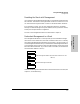
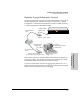
Configuration”. Use the following illustration to set up a modem connection
to a Switching Hub with a Management module
After you have set up your modems, make sure the terminal and modems are
functioning properly, then establish the link between the terminal's modem
and the hub’s modem according to the modem instructions.
If you are using the ASCII console, press [Return] several times for the => or
Password prompt. The baud rate for communication between the hub and the
modem is set automatically when you press [Return].
Hub with Management Module
“straight-through”
“straight-through”
External “remote” modem
External “local” modem
PC running
(You can also use an internal modem.)
modem cable
modem cable
RJ-11 telephone
cable
RJ-11 telephone
cable
an ASCII terminal program
or dumb terminal