
Installation and Reference Guide (J3210A, J3212A, J3200A, J3202A, J3204A) 1996-08

2-2
Management Module Features
Port Switching
Management Module
Features
Port Switching
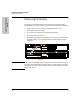
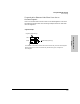
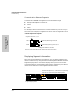
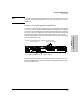
Within each Switching Hub, there are four distinct network segments, as if
there were actually four hubs in one. These segments run through an entire
stack of hubs through the Extender Cable. Port switching is the ability to move
ports from one segment to another through software rather than physically
moving cables in the wiring closet.
Note In previous hub documentation, HP has used the term “segmentation” and
“auto-segmentation” to mean partitioning. In this manual and future manuals,
segmentation means dividing a hub into different collision domains and
partitioning means that a port has been temporarily disabled because of
excessive collisions.
Increasing Throughput with HP Switching Hubs
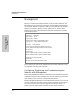
HP Switching Hubs have four segments (or collision domains) which you can
move ports to by using the ASCII console or HP AdvanceStack Assistant.
Every user is placed on segment 1 by default. If the network becomes con-
gested and network performance suffers, the Management Module can be
used to move ports onto the three other segments in the stack. (Note that if
you have an HP Switch Module in the stack, it can automatically distribute
users across all segments on power up.)
S
e
g
m
e
n
t
1
Extender Cable
S
e
g
m
e
n
t
2
S
e
g
m
e
n
t
3
S
e
g
m
e
n
t
4
}