
Installation and Reference Guide (J3210A, J3212A, J3200A, J3202A, J3204A) 1996-08

1-5
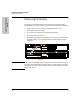
Installing the Management Module
Installation Steps
Installing the Management
Module
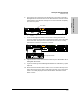
You have now completed installation and verification of the module. The
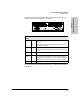
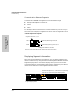
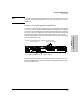
hardware features of this module are as follows:
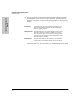
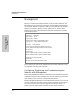
To configure IP/IPX for the Management Module, see Appendix D, “Network
Addressing”.
LED or
Button
Status Description
Active ON
OFF
Specifies this module is the primary module if a second module is
in the stack.
This module is the redundant module in the stack and will take over
if the primary module fails.
Fault ON The Module has experienced a failure, possibly because of incor-
rect installation of the SIMM module or incorrect installation into
the hub.
Reset - Resets all hubs and modules in the stack.
Segment
Display
- Lights the Segment number and Port LEDs to show which nodes are
on a segment. Segment number is lit. (If you hold this button down
for eight seconds, all Segment numbers are lit on the Management
Module and you will clear the password to the ASCII console.)
1, 2, 3, 4 ON Number of segment being displayed.
Active
Base MAC Address