
Installation and Reference Guide (J3210A, J3212A, J3200A, J3202A, J3204A) 1996-08

1-4
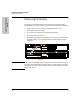
Installing the Management Module
Installation Steps
Installing the Management
Module
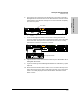
11. Turn on the power to the hub with the Management Module and then
provide power to the rest of the hubs in the stack. Provide power by
plugging in the power cord to the hub. During power-on, the following
occurs:
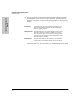
If the Fault LED is on, refer to chapter 5, “Troubleshooting” in this guide.
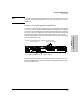
At Power On Hub begins power-on self test followed by the module’s self
test. Ports are temporarily disabled until the Management
Module configures the ports.
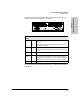
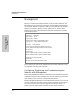
During Self-Test All Module LEDs are on. The hub and module self-tests require
about 10 seconds total. If a SIMM is added, the self-test re-
quires 30 seconds’ time. For every hub in the stack add about
2 seconds to the self-test time. A stack of eight hubs will take
about 20 seconds to complete.
After Self-Test All of the module LEDs turn off except the Active LED for the
primary module. The redundant module will have no LEDs on.