
Ethernet SNMP Module Installation and Reference Guide ( J2603B) 1995-10

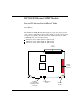


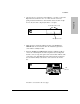

1. Unscrew the two captured screws holding the cover plate to the hub’s
Expansion Slot and remove the cover. Note that the screws are
spring loaded and will release outward when unscrewed far enough.
Do not unscrew them completely from the cover plate.
2. (Optional step). Install an auxiliary module on the HP Ethernet
SNMP Module. See the instructions in the installation guide that
came with the auxiliary module.
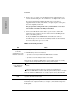
3. Insert the HP Ethernet SNMP Module (with the auxiliary module, if
one has been installed) into the hub’s expansion slot. Leading with
the hub connector edge, line up the sides of the module with the rails
on the sides of the hub’s Expansion Slot. Then push the module into
the slot until it is firmly seated in the connector in the back of the
slot.
Procedures continued on the next page.
Expansion Slot
loosen these two screws
hub expansion slot
hub
connector
Installation
Installation
1-3