
Ethernet SNMP Module Installation and Reference Guide ( J2603B) 1995-10


LED Location
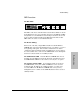
The Hub LEDs
The LEDs on the front of the HP AdvanceStack 10Base-T Hub are shown
in the illustration above. Pay particular attention to the LED labeled Exp
Slot (AdvSlot on some HP AdvanceStack hubs). It describes the self test
status of all the modules installed in the Expansion Slot. The module
LEDs define the status of each individual module.
The Module LED(s)
On the back of the hub, a single LED is installed on the HP Ethernet
SNMP Module as shown in the illustration in the “At a Glance” section at
the beginning of this guide. If the module is installed into the hub in
combination with an auxiliary module, this LED may be used to indicate
if a self test failure has occurred on the SNMP Module and to distinguish
that from a self test failure on an auxiliary module.
The SNMP Module LED If the HP Ethernet SNMP Module alone is
installed, the hub’s LEDs provide all the diagnostic information needed;
the SNMP Module’s LED is not used and is covered by the cover plate.
The Auxiliary Module LEDs If an auxiliary module is attached to
the SNMP Module, it may have additional LEDs that can be used for
troubleshooting. In addition, the auxiliary module’s cover plate may
reveal the LED on the HP Ethernet SNMP Module so that you may
distinguish between a failure on the SNMP Module and on the attached
auxiliary module.
Troubleshooting
Troubleshooting
3-3