
Ethernet SNMP Module Installation and Reference Guide ( J2603B) 1995-10
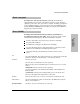
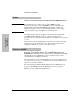
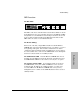
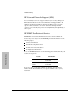


The primary tools for troubleshooting the SNMP Module are the LEDs
on the front of the hub and, in some cases, the single LED on the SNMP
Module in combination with the LEDs on an auxiliary module. The
location of these LEDs are described on the next page.
Diagnosing With the LEDs
1. When the hub is first powered on or when it is reset, it executes its
self test and also causes the SNMP Module and any auxiliary module
to execute their self tests. If only the SNMP Module is installed, the
self test should take up to 40 seconds. If an auxiliary module is also
installed, the self test may take up to 60 seconds. During the self test
of the modules, the Exp Slot LED on the front of the hub flashes.
If you suspect improper operation of the SNMP or auxiliary module,
you can reset the hub and use the self test results to verify the
module status.
2. If beyond the self test time the Exp Slot LED continues to flash
instead of turning continuously ON, there may be an error condition
on the HP Ethernet SNMP Module and/or the auxiliary module.
• If only the SNMP Module is installed, proceed to step 3.
• If an auxiliary module is also installed, more information on the
cause of the self test failure may be available by viewing the hub’s
Expansion Slot cover plate. If the Fault LED on the SNMP
Module is visible and is ON, the SNMP Module has failed its self
test. In this case, ignore any LEDs on the auxiliary module. If the
Fault LED on the SNMP Module is OFF, the SNMP Module has
passed its self test; the problem may be with the auxiliary
module. If there are LEDs on the auxiliary module, check them
for indications of failure. See your auxiliary module
documentation for more information.
3. Verify that the modules are installed correctly. If they are installed
incorrectly, repeat the installation procedure, taking special care to
ensure that any auxiliary module is properly connected to the SNMP
Module, and that the SNMP Module’s hub connector is firmly seated
in the connector at the back of the hub’s Expansion Slot.
4. If repeating the installation procedure does not rectify the problem
and the Exp Slot LED on the hub still fails to stay continuously ON,
contact your HP-authorized LAN dealer or HP representative for
replacement information.
Troubleshooting
Troubleshooting
3-2