
Ethernet SNMP Module Installation and Reference Guide ( J2603B) 1995-10

Send Alarm when intruder detected? and Eavesdrop prevention?:
These parameters are defined earlier in the chapter under “Security
Configuration Parameter Definitions”.
The values you select for these parameters will be applied to all the
twisted-pair ports for which you have selected (or retained) the
address selection method.
If, for example, you pressed the [Esc] key after selecting an address
selection method for port A10, the Send Alarm and Eavesdrop
prevention values you select would be applied to ports A1 through
A10 only. For all remaining ports, the previous value for these
parameters would be retained.
Showing the Security Configuration
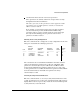
Enter the command
SE SH to display the security configuration for all of the
hubs ports. A table like the following is presented:
PORT
_______
ADDRESS
SELECTION
METHOD
______________
AUTHORIZED
ADDRESS
_____________
EAVESDROP
PREVENTION
_____________
SEND
ALARM
______
DISABLE
PORT *
________
A1
A2
A3
.
.
.
CONTINUOUS
CONTINUOUS
FIRST HEARD
123456-890123
NONE
123456-789012
YES
NO
YES
NO
NO
YES
NO
NO
YES
The vertical bar between Send Alarm and Disable Port indicates that the
value for the Disable Port parameter is not directly configurable. This
parameter is automatically set by the Address Selection Method. If the
method is either First Heard or Assigned, and if at least one of the other
security parameters is set to YES, the Disable Port parameter will be YES. If
the method is Continuous, the Disable Port parameter is always
automatically set to NO.
Clearing Security Violation Indicators
Enter the command
SE CL to clear any security violation indicators and to
“rearm” the indicators to be ready for the next intrusion. The indications are
slightly different between port security violations and network management
security violations, as described next.
Extended Hub
Capabilities
Extended Hub Capabilities
2-25