
Ethernet SNMP Module Installation and Reference Guide ( J2603B) 1995-10
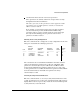

Example: To add the network management station with IP address
190.40.101.10 to the list and to send alarms to that station, the process would
appear as follows:
Add entry (A), Delete entry (D), or End changes (E): A
Enter Manager Address, or (A) to allow all managers access: 192.1.1.1
Should this manager receive alarms: (Y/[N]):Y
Add entry (A), Delete entry (D), or End changes (E): E
Current authorized manager list:
ID Manager Address (IP or IPX) Receive Alarms?
0 All managers allowed NA
1 190.040.101.010 YES
2
To delete an entry, specify the ID number in the list corresponding to the
network management station to be deleted.
Example: To delete the entry made in the example above, the steps would
be:
Add entry (A), Delete entry(D), or End changes (E): D
Enter ID of entry to delete: 1
Add entry (A), Delete entry (D), or End changes (E): E
The table entry with ID 1 would now be a blank line.
PAssword
To set or change the password on the hub. The password is used to
prevent unauthorized access to the hub from network management
stations, and through the console interface. The hub is initially shipped
without a password. Follow the prompts to enter a new password or to
change the existing password. If you assign a password, it is also used as the
SNMP community name.
If you decide to delete the password, enter the Password command, then
press [Return] without entering any characters at the password prompt.
Clearing a Forgotten Hub Password: If you have forgotten or
misplaced the password, see page 1-7.
Extended Hub
Capabilities
Extended Hub Capabilities
2-19