
Ethernet SNMP Module Installation and Reference Guide ( J2603B) 1995-10

3. Configure the modem as described in appendix B, “Modem
Configuration”.
4. At the remote site, connect the terminal (or PC emulating a terminal)
to the remote modem. Make sure the terminal and modems are
functioning properly, then establish the link between the terminal’s
modem and the hub’s modem according to the modem instructions.
5. Press [Return] several times for the => or Password prompt. The baud
rate for communication between the hub and the modem is set
automatically when you press [Return].
Using the Console
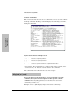
The console session starts with a display similar to the following (the actual
version numbers may be different):
HP J2603A Ethernet SNMP module
ROM A.01.00
EEPROM V.03.03
HW X.P3.11
Use HP Stack Manager or console commands for hub configuration.
Enter password:
A console session is currently active.
Do you want to break in? (Y/[N]) Y
Connecting...
Enter a console command, or HE or ? for help.
=>
If a password has not
been assigned with
the PAssword
command, then you
are not prompted for
your password here.
If you are using
Telnet, the message
“Use HP Stack
Manager. . . ” is not
relevant and is not
displayed.
If a console session is
currently active, then
you are prompted to
break the current
active console
session.
Extended Hub
Capabilities
Extended Hub Capabilities
2-9