
HP 9000 rp8420 Server - User Service Guide, Fifth Edition

IMPORTANT: Complete information regarding OL* for I/O cards is on the Web at
http://docs.hp.com. Refer to the Interface Card OL* Support Guide for details. It is strongly
recommended that you obtain a copy of this guide and refer to it before beginning the removal
and replacement of PCI cards.
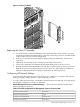
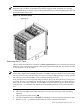
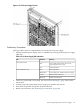
Figure 6-47 PCI Card Location
Removing the PCI Card
This procedure describes how to perform an online replacement of a PCI card using the attention
button for cards whose drivers support online add or replacement (OLAR). The attention button
is also referred to as the doorbell.
NOTE: HP 9000 rp8420 servers implement manual retention latch (MRL) hardware for use in
online add or replacement (OLAR) operations. If an MRL is left open while the server is booting,
HP-UX can incorrectly cache PCI slot power status causing OLAR operations to fail. To prevent
this situation, ensure all the MRLs are closed before booting the server.
If OLAR reports that a slot is present and powered off, but no OLAR operations to turn power
on to that slot have succeeded even after the MRL is closed, the MRL may have been left open
during boot. To clear this condition, close the MRL for the PCI slot then power off the PCI slot
using the rad -o command. This will allow future OLAR operations to succeed on this PCI
slot.
Prerequisites for this procedure:
• The card to be replaced uses the same drivers and is of the same type as the card being
replaced.
• The green power LED is steady ON.
• The yellow attention LED if steady OFF or is blinking if a user has requested the slot location.
• Run the olrad -q command to determine the status of all the PCI I/O slots.
Removing and Replacing a PCI Card 155