
HP 9000 rp8420 Server - User Service Guide, Fifth Edition


Removing the Front Bezel
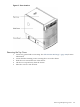
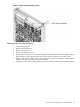
Figure 6-4 HP 9000 rp8420 server Bezel Removal and Replacement
• From the front of the server, grasp both sides of the bezel and pull firmly toward you. The
catches will release and the bezel will pull free.
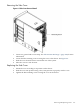
Replacing the Front Bezel
1. If the bezel is being replaced, visually inspect the replacement part for the proper part
number.
2. From the front of the server, grasp both sides of the bezel and push toward the server. The
catches will secure the bezel to the chassis.
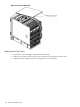
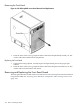
Removing and Replacing the Front Panel Board
The front panel board is located in the front of the chassis. The system power must be turned off
to replace this FRU. See “Powering down Hardware Components and Powering on the Server”
(page 103).
108 Removal and Replacement