
Installation Guide, Fifth Edition - HP 9000 rp8420 Server

Chapter 2
Installation
Cabling and Power Up
64
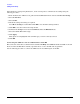
1. Apply power to the server cabinet.
Apply power to any other server cabinets that were shipped to the customer site.
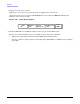
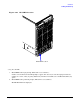
On the front of the server, a solid green Standby Power, and a solid green MP Present light will
illuminate after about 30 seconds.
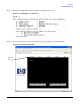
Figure 2-28 Front Panel Display
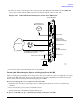
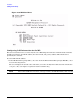
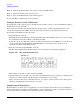
2. Check the BPS LED for each BPS. See Figure 2-29 on page 65 for the LED location.
When on, the breakers distribute power to the BPS. AC power is present at the BPS:
• When power is first applied. Observe the BPS LEDs will be flashing amber.
• After 30 seconds have elapsed. Observe the flashing amber BPS LED for each BPS becomes a flashing
green LED.
RUN
Fault
Attention Remote
MP Present
Standby Power
Power
Power
Switch