
Installation Guide, Fifth Edition - HP 9000 rp8420 Server

Chapter 2
Installation
Cabling and Power Up
55
WARNING SHOCK HAZARD
Risk of shock hazard while testing primary power.
Use properly insulated probes.
Be sure to replace access cover when finished testing primary power.
Step 10. Set the server power to
ON.
Step 11. Check that the indicator light on each power supply is lit.
Connecting AC Input Power
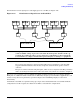
The server can receive AC input from two different AC power sources. If two separate power sources are
available, each source can be plugged into the server, increasing system reliability if one power source fails.
The main power source is defined to be A0 and A1. The redundant power source is defined to be B0 and B1.
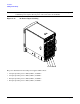
See Figure 2-23 for the AC power input label scheme.