
Installation Guide, Fifth Edition - HP 9000 rp8420 Server

Chapter 2
Installation
Manual Lifting
28
Manual Lifting
Use this procedure only if no HP approved lift is available.
This procedure should only be performed by four qualified HP Service Personnel utilizing proper lifting
techniques and procedures.
System damage can occur through improper removal and re-installation of devices. This task must be
performed by trained personnel only. Instructions for removing and re-installing components can be found in
the Removal and Replacement chapter of the HP Service Guide: HP 9000 rp8420 server.
CAUTION Observe all ESD safety precautions before attempting this procedure. Failure to follow ESD
safety precautions could result in damage to the server.
Step 1. Follow the instructions on the outside of the server packaging to remove the banding and cardboard
top from the server pallet.
Step 2. Reduce the weight by removing all bulk power supplies and cell boards. Place each on an ESD
approved surface.
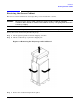
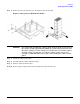
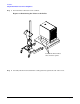
Step 3. Locate the four positioning handles on the sides of the system. They are color coded blue and
located close to each base corner of the unit.
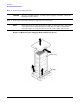
Step 4. Ensure the vertical support brackets are in the down position so they rest on the slides when the
server is lowered to the rack slides. There are two brackets on each side of the server chassis.
Step 5. Unfold the handles so they are extended out from the unit. The server is now ready for manual
lifting by the four qualified HP Service Personnel.
Step 6. Lift the server into place and secure as required.
Step 7. After the server is secured, re-install the previously removed cell boards and bulk power supplies.