
Installation Guide, Fifth Edition - HP 9000 rp8420 Server

Chapter 1
Introduction
Overview
19
Internal Disk Devices for the HP 9000 rp8420 server
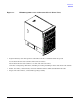
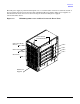
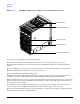
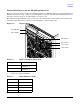
Figure 1-5 shows the location of the internal hard disk drives in a HP 9000 rp8420 server. The internal hard
disk drives in slots 0 & 1 (top) connect to cell 0 through the core I/O for cell 0. The internal hard disk drives in
slots 2 & 3 (bottom) connect to cell 1 through the core I/O for cell 1.
The upper removable media drive (slot 0) connects to cell 0 through the core I/O card for cell 0 and the lower
removable media drive (slot 1) connects to cell 1 through the core I/O card for cell 1.
Figure 1-5 Internal Disks
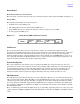
Table 1-2 Removable Media Drive Path
Removable Media Path
Slot 0 Media
0/0/0/2/1.x
a
.0
a. X equals 2 for a DVD drive while X
equals 3 for a DDS-4 DAT drive.
Slot 1 Media
1/0/0/2/1.x
a
.0
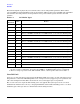
Table 1-3 Hard Disk Drive Path
Hard Drive Path
Slot 0 Drive 0/0/0/2/0.6.0
Slot 1 Drive 0/0/0/3/0.6.0
Slot 2 Drive 1/0/0/2/0.6.0
Slot 3 Drive 1/0/0/3/0.6.0
Slot 0 Media
Slot 1 Media
Slot 0 Drive
Slot 1 Drive
Slot 3 Drive
Slot 2 Drive