
HP 9000 rp8420 Server - User Service Guide, Fifth Edition
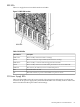

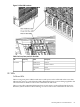
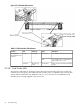


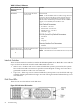

Figure 5-6 PCI OL* LED Locations
Table 5-6 OL* LED States
Attention (Yellow)Power (Green)State
OffOnNormal operation, slot power on
FlashingOnSlot selected, slot power on
OnOnSlot needs attention, slot power on
OffOffSlot available, slot power off
FlashingOffReady for OL*, slot power off
OnOffFault detected, slot power off
OffFlashingSlot powering down or up
Core I/O LEDs
The core I/O LEDs in Table 5-7 “Core I/O LEDs” are located on the bulkhead of the installed core
I/O PCA. There is a DIP switch on the core I/O card that is used to select which MP firmware set
(indicated by the MP SEL LED) is selected for loading. The DIP switch is only visible when the
core I/O card is removed from the system and is located in the center of the PCA.
HP 9000 rp8420 server LED Indicators 87