
HP 9000 rp8420 Server - User Service Guide, Fifth Edition
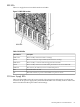

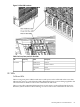
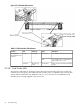


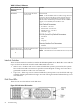

Figure 5-3 PCI Power Supply LED Locations
Table 5-3 PCI Power Supply LEDs
DescriptionStateDriven ByLED
All output voltages generated by the power supply are
within limits.
On GreenEach supplyPower
Power to entire system has been removed.Off
Not currently used for status.YellowMP through PCI
LPM
1
Attention
The temperature within the power supply is above the
lower threshold.
Flash YellowEach supplyFault
The temperature of the power supply is approaching the
thermal limit.
On Yellow
Power supply has shut down because of an over
temperature condition, a failure to regulate the power
within expected limits, or a current-limit condition.
Flash Red
Normal operation.Off
1 LPM stands for local power monitor
System and I/O Fan LEDs
There is a single, three-color LED located on the front OLR fan, the rear OLR fan and the PCI
I/O fan.
84 Troubleshooting