
HP 9000 rp8420 Server - User Service Guide, Fifth Edition




The Server Powers On but Fails Power-On Self Test
To check for the following problems when the server fails power-on self test (POST):
1. Check for error messages on the system console.
2. Check for fault LEDs.
3. Check for error messages in the MP logs.
HP 9000 rp8420 server LED Indicators
The HP 9000 rp8420 server has LEDs that indicate system health. This section defines those LEDs.
Front Panel LEDs
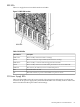
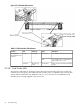
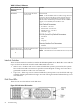
There are seven LEDs located on the front panel.
Figure 5-1 Front Panel with LED Indicators
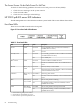
Table 5-1 Front Panel LEDs
DescriptionStateDriven ByLED
48 V good (LED works even if MP is not installed, or
installed and is not active)
On GreenGPM
1
Power
48 V offOff
3.3 V standby good (LED works even if MP is not installed,
or installed and is not active)
On GreenGPMStandby Power
3.3 V standby offOff
At least one MP is installed and activeOn GreenGPMMP
2
Present
No MPs are installed or at least one is installed but not
active
Off
Dial-in (remote) console enabledOn GreenMP by way of
GPM
Remote
Dial-in (remote) console is disabled, or MP is not installed,
or MP is installed and not active
Off
Chassis log alert unreadFlash YellowMP by way of
GPM
Attention
No alert, or MP is not installed, or MP is installed and not
active
Off
One or more partitions runningOn GreenPDC
3
/MP by
way of GPM
Run
No partition running, or MP is not installed, or MP is
installed and not active
Off
One or more partitions have reported a faultFlash RedPDC/MP by
way of GPM
Fault
No partitions running, or MP is not installed, or MP is
installed and not active
Off
1 GPM stands for global power monitor
2 MP stands for manageability processor
3 PDC stands for processor dependent code
82 Troubleshooting