
HP 9000 rp8420 Server - User Service Guide, Fifth Edition


active power. Selecting the Grids A & B option directs the MP utilities to sense active power at
locations A0-A1-B0-B1.
1. At the MP prompt, enter cm. This will display the Command Menu and allow for viewing
and configuring various utilities controlled by the MP.
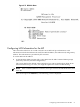
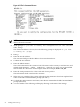
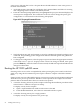
2. From the command prompt (MP:CM>), enter pwrgrd. The pwrgrd command displays the
current power configuration. This command can also be used to change the power grid
configuration. A screen similar to the following is displayed:
Figure 4-18 The pwrgrd Command Screen
3. Verify that the power grid configuration is correct by examining the output from the pwrgrd
command. The preceding power configuration indicates that both grid A and grid B have
been configured.
4. To change the configuration, select the proper response and enter the appropriate numeric
value when Select Option: displays on the screen. If no change is desired, enter q and
press the Enter key. After the value has been entered, the MP will respond and indicate the
change has taken effect.
Booting the HP 9000 rp8420 server
Powering on the server can be accomplished by either pressing the power switch on the front
panel or by using the PE command to power up the cabinet or complex at the MP command
menu.
If using a LAN crossover cable with the laptop, review server activity for each partition configured
while the server powers up and boots. Windows can be opened for the complex and for each
partition. HP recommends that at least two windows be opened:
• A window showing all activity in the complex. Following the installation procedure in this
manual causes a window to be open at startup.
To display activity for the complex:
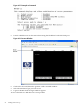
1. Open a separate Reflection window and connect to the MP.
2. From the MP Main Menu, select the VFP command with the s option.
• A window showing activity for a single partition.
To display activity for each partition as it powers up:
76 Cabling and Power Up