
HP 9000 rp8420 Server - User Service Guide, Fifth Edition


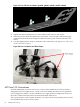

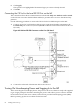
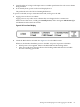


Figure 4-11 BPS LED Location
3. Log in to the MP:
a. Enter Admin at the login prompt. (This term is case-sensitive.)
It takes a few moments for the MP prompt to appear. If it does not, be sure the laptop
serial device settings are correct: 8 bits, no parity, 9600 baud, and None for both Receive
and Transmit. Then, try again.
b. Enter Admin at the password prompt. (This term is case-sensitive.)
The MP Main Menu is displayed:
70 Cabling and Power Up