
HP 9000 rp8420 Server - User Service Guide, Fifth Edition




Removing the Side Cover
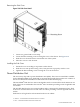
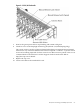
Figure 2-16 Side Cover Detail
1. Connect to ground with a wrist strap.
2. Loosen the blue retaining screw securing the cover to the chassis. See Figure 2-16.
3. Slide the cover from the chassis toward the rear of the system.
4. Place the cover in a safe location.
Installing the Side Cover
1. Orient the cover according to its position on the chassis.
2. Slide the cover into position using a slow, firm pressure to properly seat the cover.
3. Tighten the blue retaining screw securing the cover to the chassis.
Power Distribution Unit
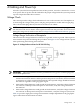
The server may ship with a power distribution unit (PDU). There are two 60A PDUs available
for the HP 9000 rp8420 server. Each PDU is mounted horizontally between the rear columns of
the server cabinet. The 60A PDUs are delivered with an IEC-309 60A plug.
The 60A NEMA
2
PDU has four 20A circuit breakers and is constructed for North American use.
Each of the four circuit breakers has two IEC
3
-320 C19 outlets providing a total of eight IEC-320
C19 outlets.
The 60A IEC PDU has four 16A circuit breakers and is constructed for International use. Each
of the four circuit breakers has two IEC-320 C19 outlets providing a total of eight IEC-320 C19
outlets.
Each PDU is 3U high and is rack-mounted in the server cabinet.
2. NEMA — National Electrical Manufacturers Association
3. IEC — International Electrotechnical Commission
Power Distribution Unit 51