
HP 9000 rp8420 Server - User Service Guide, Fifth Edition




Top and Side Cover Installation
NOTE: It might be necessary to remove existing top and side covers installed on the server
before installing the covers shipped with the wheel kit. If cover removal is not needed, go directly
to the sections for installing the top and side cover.
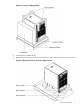
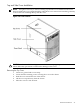
Figure 2-14 Cover Locations
CAUTION: Observe all ESD safety precautions before attempting this procedure. Failure to
follow ESD safety precautions could result in damage to the server.
Removing the Top Cover
1. Connect to ground with a wrist strap.
2. Loosen the blue retaining screws securing the cover to the chassis.
3. Slide the cover toward the rear of the chassis.
4. Lift the cover up and away from the chassis.
5. Place the cover in a safe location.
Wheel Kit Installation 49