
HP 9000 rp8420 Server - User Service Guide, Fifth Edition



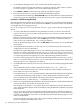

See “Shutting Down HP-UX” (page 206) for details on shutting down the HP-UX operating system.
CAUTION:
ACPI Configuration for HP-UX Must Be “default” On nPartition-capable HP Integrity servers,
to boot the HP-UX operating system an nPartition must have its ACPI configuration value set
to default.
At the EFI Shell interface, enter the acpiconfig command with no arguments to list the current
ACPI configuration. If the acpiconfig value is not set to default, then HP-UX cannot boot;
in this situation you must reconfigure acpiconfig or else booting will be interrupted with a
panic when launching the HP-UX kernel.
To set the ACPI configuration for HP-UX: at the EFI Shell interface enter the acpiconfig
default command, and then enter the reset command for the nPartition to reboot with the
proper (default) configuration for HP-UX.
HP-UX Booting
You can boot HP-UX by using any one of the following procedures:
• “HP-UX Booting [BCH Menu]” (page 196)
The BCH system boot environment is provided on HP 9000 servers.
• “HP-UX Booting [EFI Boot Manager]” (page 197)
The EFI system boot environment is provided on HP Integrity servers.
• “HP-UX Booting [EFI Shell]” (page 198)
The EFI system boot environment is provided on HP Integrity servers.
Procedure E-1 HP-UX Booting [BCH Menu]
From the BCH Menu, use the BOOT command to boot the HP-UX operating system. The BCH
Menu is available only on HP 9000 servers.
1. Access the BCH Main Menu for the nPartition on which you want to boot HP-UX.
Login to the service processor (MP or GSP) and enter CO to access the Console list. Select
the nPartition console. When accessing the console, confirm that you are at the BCH Main
Menu (the Main Menu: Enter command or menu> prompt). If at a BCH menu other
than the Main Menu, then enter MA to return to the BCH Main Menu.
2. Choose which device you wish to boot.
From the BCH Main menu, use the PATH command to list any boot path variable settings.
The primary (PRI) boot path normally is set to the main boot device for the nPartition. You
also can use the SEARCH command to find and list potentially bootable devices for the
nPartition.
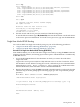
Main Menu: Enter command or menu > PATH
Primary Boot Path: 0/0/2/0/0.13
0/0/2/0/0.d (hex)
HA Alternate Boot Path: 0/0/2/0/0.14
0/0/2/0/0.e (hex)
Alternate Boot Path: 0/0/2/0/0.0
0/0/2/0/0.0 (hex)
Main Menu: Enter command or menu >
3. Boot the device using the BOOT command from the BCH interface.
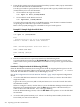
You can issue the BOOT command in any of the following ways:
196 Operating System Boot and Shutdown