
HP 9000 rp8420 Server - User Service Guide, Fifth Edition



3. Remove the front bezel, top and right side covers. See “Removing and Replacing Covers”
(page 104).
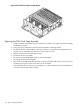
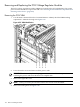
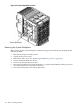
Figure 6-53 PCI-X Card Cage Assembly Location
Removing the PCI-X Card Cage Assembly
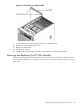
1. Confirm the target chassis identity by checking cabinet and chassis labels.
2. Unplug all I/O cables from PCI cards and remove the cards.
3. Remove PCI fans.
4. Remove PCI panel.
5. Unseat the PCI power supplies (bricks) and pull them 1.5 inches out of the chassis.
6. Unplug the two mass storage power cables and the OLR cable.
7. Loosen the two thumbscrews.
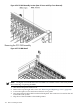
8. Using board extractors, unseat the PCI-X backplane.
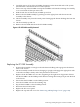
9. Using handles, tilt and lift the backplane out of chassis.
Removing and Replacing the PCI-X Card Cage Assembly 161