
HP 9000 rp8420 Server - User Service Guide, Fifth Edition
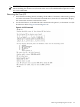

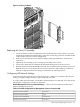
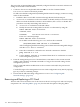
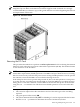
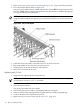


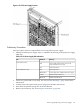


Figure 6-46 Core I/O Detail
Replacing the Core I/O Assembly
1. Locate the battery on the new MP. Remove the insulating mylar strip. If there is no mylar
strip then momentarily break the battery connection to clear any previously stored data that
could conflict with your current configuration.
2. Slide the core I/O into the chassis while rocking it gently up and down to mate the two
connectors.
3. Tighten the two retaining screws securing the assembly to the chassis.
4. Connect the cables that were labeled and detached during removal of the core I/O.
5. Reset the nPartition with the MP RR command. This command will stop the boot process at
BIB and allow you to check the firmware revision of the new MP. Update or backdate as
needed. Configure the network settings as outlined in the following section.
Configuring MP Network Settings
After removing and replacing the core I/O in the server, configure its customer LAN network
settings, using the settings from the original (replaced) core I/O.
To configure MP network settings, use the MP Command menu’s LC command. To list the current
MP network configuration, use the LS command.
Default Management Processor Network Settings Table 6-3 lists the default customer LAN
network settings for the server.
Table 6-3 Default Configuration for Management Processor Customer LAN
192.168.1.1Customer LAN IP Address
gsp0Customer LAN Host Name
255.255.255.0Customer LAN Subnet Mask
192.168.1.1Customer LAN Gateway
Removing and Replacing the Core I/O 153