
HP 9000 rp8420 Server - User Service Guide, Fifth Edition


Replacing a Cell Board
NOTE: The cell board weighs 27.8 lb. Support both side edges while replacing the cell board
into the chassis.
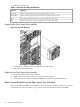
1. Move the slide to the unlocked position and fully open each latch on the cell board.
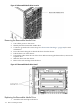
2. Insert the cell board into the guide rails. Slide into the chassis until the cell board levers
contact the cell board guide rails. See Figure 6-19 for details.
3. Using equal pressure, simultaneously press both extraction levers to seat the cell board in
the chassis.
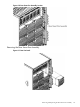
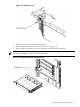
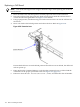
4. Move each slide to the locked position and release the lever. Refer to Figure 6-20.
Figure 6-20 Extraction Lever
Ensure that both levers are in the locked position. If both levers are not locked, the cell board
will not power up.
5. Enter de from the Command Menu to verify that the extraction levers are locked and the
cell board is in the proper operational status. See Figure 6-21 (page 121).
6. Enter h to select the Cell Board Controller (PDHC) and then enter the cell number.
120 Removal and Replacement