
HP 9000 rp8420 Server - User Service Guide, Fifth Edition

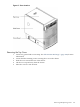
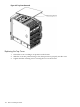
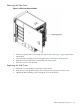
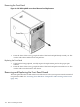
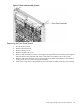
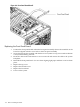

Figure 6-1 Cover Locations
Removing the Top Cover
1. Connect to ground with a wrist strap. See “Electrostatic Discharge ” (page 103) for more
information.
2. Loosen the blue retaining screws securing the cover to the chassis.
3. Slide the cover toward the rear of the chassis.
4. Lift the cover up and away from the chassis.
5. Place the cover in a safe location.
Removing and Replacing Covers 105