
Installation Guide, Fifth Edition - HP 9000 rp8420 Server

Chapter 2
Installation
Receiving the Server Cabinet
24
Step 4. Remove the packing materials.
CAUTION To reduce any ESD exposure, cut off the plastic wrapping around the cabinet. DO
NOT pull it off the cabinet.
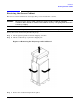
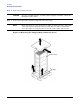
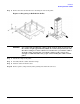
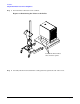
Step 5. Remove the bolts holding down the ramps and remove the ramps.
NOTE Figure 2-2 shows one ramp attached to the pallet on either side of the cabinet with
each ramp secured to the pallet using two bolts. There is another configuration
where the ramps are secured together on one side of the cabinet with one bolt.
Figure 2-2 Removing the Shipping Bolts and Plastic Cover
Ramp(s)
Plastic wrap