
HP 9000 rp8420 Server - User Service Guide, Fifth Edition

Instructions
• The user logs in to the server console through the LAN, local serial, or remote serial locations.
• The user types the FW command to start the firmware update.
NOTE: The LAN configuration for the server must be set for the FTP connection to function
correctly regardless of whether the console LAN, local serial, or other connection is used to issue
the FW command.
FW—Firmware Update
• Access Level: Administrator
• Scope: Complex
• Description: This command prompts the user for the location of the firmware software and
the FLASH handle (from a list) which represents all upgradeable entities.
DFW—Duplicate Firmware
• Access Level: Administrator
• Scope: Complex
• Description: This command allows field support personnel to copy firmware already installed
on the system to an equivalent entity in the same complex.
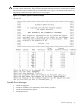
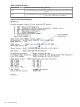
Figure 5-11 illustrates the output and questions requiring responses. After the user replies Y to
the confirmation request, the firmware update makes the connection to the FTP server at the IP
address given using the user and password details supplied. The appropriate files will be
downloaded and burned into the selected flash memories. Note that the firmware update validates
the image to determine that the image name supplied is that of a valid image type before burning
the image into the flash memory.
96 Troubleshooting